Results for social media hacks

How to permanent track a lost phone or any network device

July 07, 2018

How to track a lost Android phone with Android Device Manager


If you have lost your phone don’t worry, it is often possible to get it back. With the free Android Device Manager tool you can locate your phone, seeing its position on a map so you can track it down
ADM also enables you to lock the device so that nobody will be able to see your data, and if you suspect it may have actually been stolen instead then you can remotely initiate a factory reset—wiping all your information and accounts so they are completely protected.
Android Device Manager is built-in on every new Android phone and tablet and it runs permanently in the background. So long as the device has an internet connection either through your SIM card or wi-fi, it is able to report the its whereabouts. Accessing the information that ADM is reporting is done via your Google account on any web browser—so even if you’re travelling when you lose it you still have a chance of tracking it down.

Activate Android Device Manager


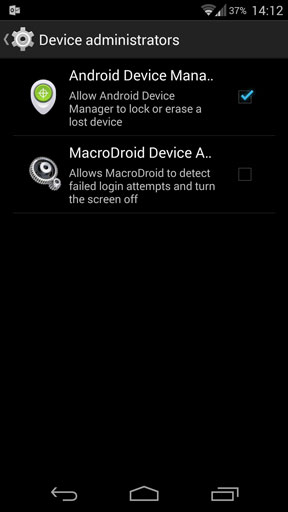
ADM is rather hidden within Android. Go to Settings > Security and scroll down to Device administrators. Here you will see an option labelled Android Device Manager. Tick the box to activate the service.
That’s all there is to it. There’s nothing else to configure on the handset itself—the service will function as and when you need it.

Your phone’s position will be shown on a Google Map. It’s accurate to a few metres although does not update in real time so refresh the screen to see if it is moving.
If the phone is nearby—lost somewhere in your house, for example—click the Ringbutton. The phone will ring for five minutes at maximum volume (even if you’d got it set to silent). When you find the phone press the power button to stop it ringing.
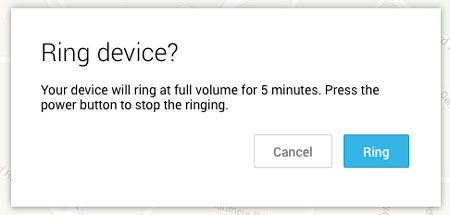
ring-ADM
If the device isn’t nearby but you think you may be able to recover it you can click the Lock button. This locks the device and replaces the existing lock screen. You can add a message asking the person who finds the device to contact you.
new-lock-screen-ADM
Alternatively, if your device has been stolen, or you don’t want to risk your data you can click the Erase button. This will completely wipe the phone by performing a factory reset.
erase-ADM
If you’ve got more than one Android device you can install the Android Device Manager app on both of them and you’ll be able to track and manage one from the other.

If your phone is turned off

Your device needs a live data connection to be able to be tracked. However some commands, such as the Erase command, will be sent and executed the next time the device connects to the network. Obviously if the person in possession of the phone factory resets it there’s nothing you can do, although at least your data will not be compromised if this happens.


Track your phone

You can locate and manage your phone through any web browser. Go to www.google.com/android/devicemanagerand login to your Google account.

The device manager service will now launch and attempt to make contact with your phone. So long as the phone is switched on and has an internet connection it should be found within just a few seconds.
Lyricsiq.comhttps://lyricsiq.com for entertainment gist

How to permanent track a lost phone or any network device How to permanent track a lost phone or any network device Reviewed by Lehvi on July 07, 2018 Rating: 5

phone hacks: How to find a lost phone, or any other kind of smart phone or devices

July 02, 2018
phone hacks: How to find a lost phone, or any other kind of smart phone or devices
MOBILE
How to find a lost phone, whether it’s Android, iPhone, or any other kind
By Simon Hill — Posted on April 24, 2018 - 6:00AM
 how to find a lost phone
Tom Grundy/Shutterstock
So you’ve lost your phone. We’ve all been there. It was just in your pocket a minute ago — and now it’s gone, lost to the phone fairies, forgotten between the seats of your couch, or misplaced somewhere during your busy day. Maybe it’s just in your other coat, or maybe it’s already in the hands of someone who found it on the sidewalk. Either way, all you want to do is get it back.

Thankfully, there are plenty of ways to get a hold of your missing phone. If it’s a smartphone (or even a tablet) running iOS, Android, or even Windows Phone, chances are good it already has the software needed to hunt it down — or there’s an app you can install to track your phone. Here’s our guide on how to find a lost phone or a similar device.

Have you ever wondered what happens to a smartphone after it’s stolen? Read how this filmmaker spied on a thief to find out.

Smartphones
If your lost phone happens to be a smartphone, all three of the major smartphone platform providers (Apple, Google, and Microsoft) include phone retrieval technology in their smartphones. Usually, the way these apps work is through the account associated with your device. For Android devices this is your Google account, for iPhones, this is your iCloud account, and for Windows Phones this is your Microsoft account. All three allow you to remotely lock and wipe your phone, make it ring, and set up special messages to alert whoever finds it.

Of course, these features are only as good as your phone’s battery. If your smartphone dies, it’s about as easy to find as your wallet or anything else you might misplace.

We also recommend caution when communicating with anyone who has found your smartphone. Be careful to avoid giving away any personal information, such as your home address, until you know you’re dealing with someone you can trust. Stick with sending phone numbers or email addresses to communicate how the good Samaritan can return your phone. Here’s how each of the three operating systems work.

How to find a lost Android phone
Android not only offers Google’s proprietary service for finding and managing your device remotely but also a number of third-party apps designed for finding your smartphone. The easiest to use is Find My Device, which is built directly into your Android smartphone through Google Play Services — it can also be used in a browser or downloaded from the Google Play Store. Most devices running Android 2.3 or later should be able to use this feature.

Using the feature is as easy as searching  “Where is my phone” in Google, which will prompt the service to start looking for your smartphone. We’ve previously written about Find My Device and its ability to call you, set up a new password, and make your phone ring from afar, along with the variety of other functions it uses for notification purposes. While you can configure Find My Device ahead of time, the service should be available in the event you lose or misplace your phone. It will use Wi-Fi or GPS to help you hunt down your device.

find lost android device
To verify your Android smartphone has the Find My Device feature turned on, go to Settings > Google (or Google services) > Security and make sure Remotely locate this device is turned on in the Find My Device section.

If you can’t find your smartphone, you can always wipe it to prevent sensitive information from getting into the wrong hands. Your device will need an internet connection, however, and enough juice to communicate with you. In Android 5.0 Lollipop, Google also introduced Factory Reset Protection (FRP). It’s designed to prevent would-be thieves from being able to steal your phone, wipe it, and then use it or sell it. If you factory reset a phone with FRP enabled and try to set it up as a new device, you’ll be prompted to enter the username and password for the last Google account that was registered on the device, and if you can’t, the phone will remain locked.

There are also third-party apps that you can install to help you find your phone. Cerberus Anti-theft is a great app that offers remote access and control, allowing you to obtain more information regarding the whereabouts of your phone. It provides a number of additional features, such as more granular control on how you track your device, screenshots of what your device is doing, photos from the camera to possibly catch the would-be thief, and other, more detailed notifications that Find My Device doesn’t offer. If your device is rooted, there are even more features available to prevent someone from resetting or turning off your device until you can recover it.

Another option for select Samsung smartphones is the Find My Mobile service. It can be used to locate a missing phone, lock it down, or wipe it completely. You’ll need a Samsung account, though, and the Remote Controls options enabled on your phone. To check and see if Find My Mobile is available for your smartphone, go to Settings > Lock screen & Security. If you see Find My Mobile in the menu, you can use the service; enable the Remote Controls options via Settings > Security > Find My Mobile > Remote controls.

samsung-find-my-mobile
phone hacks: How to find a lost phone, or any other kind of smart phone or devices phone hacks: How to find a lost phone, or any other kind of smart phone or devices Reviewed by Lehvi on July 02, 2018 Rating: 5

use this to save all you passwords and Say bye to remembering passwords

June 30, 2018

While the smartphone has made many of our work easier, there is also a concern about security. Where, when a hacker breaks into our smartphone and stole our most important information, this fear remains often. To overcome this, the scientists continue to develop a better security system. Many smartphones include facial recognition, fingerprint scans and other biometric systems. However, the trouble with these easy-to-use tools is that once compromised they cannot be reset.

But now, American scientists have developed a security system that will use the smartphone's password as the brain of the user after it's been in the market. Smartphones will be unlocked only by recognizing the brainwaves in response to a series of pictures - an advance that could better protect devices from hackers. According to the scientists at Buffalo University, electroencephalography (EEG) is currently a very easy system, through which the waves of the brain can be recorded.

"You can't grow a new fingerprint or iris if that information is divulged," said Wenyao Xu, an assistant professor at the University at Buffalo (UB) in the US. "That's why we're developing a new type of password - one that measures your brainwaves in response to a series of pictures. Like a password, it's easy to reset; and like a biometric, it's easy to use," said Xu.

The "brain password," which presently would require users to wear a headset, but in the future, it has to be tried to make it even better. It could have implications in banking, law enforcement, airport security and other areas.

"To the best of our knowledge, this is the first in-depth research study on a truly cancelable brain biometric system. We refer to this as 'hard cancellation,' meaning the original brain password can be reset without divulging the user's identity," said Zhanpeng Jin, an associate professor at UB.
get the latest hacking gist here
use this to save all you passwords and Say bye to remembering passwords use this to save all you passwords and Say bye to remembering passwords Reviewed by Lehvi on June 30, 2018 Rating: 5

levi moshe sets to drop off his news single titled "chukwu okike"

June 29, 2018
levi moshe sets to drop off his new single next month titled chukwu okike
its a song he prepoares to call full soul stage performance, keep ur fingers crossed and expect  this killer jam as it dops. even though levi moshe is a  gospelartiste he has also got the vibe 
levi moshe sets to drop off his news single titled "chukwu okike" levi moshe sets to drop off his news single titled "chukwu okike" Reviewed by Lehvi on June 29, 2018 Rating: 5

Exactis Data Leaked – 340 Million Records Exposed Online

June 29, 2018
                                   
While the chaos for the infamous Equifax data breach hasn’t ended, here we have another news story about another massive breach. This time, the marketing company ‘Exactis’ unwittingly exposed customers’ data. A researcher found approx. 340 million records from the Exactis data leaked online. Presently, we are not sure whether any hacker(s) had a hand in causing the leak.

Exactis Data Leaked Details Of 340 Million Americans
As disclosed by Wired on Wednesday, marketing firm Exactis exposed a huge chunk of records from its database online. Reportedly, approximately 340 million records from Exactis was leaked on publicly accessible servers. Security researcher, Vinny Troia, discovered the data containing personal information of the users.

According to Vinny Troia, the data included the details of about 230 million American individual users. Whereas, the remaining 110 million records were business data. It is yet unknown how long the data has been available on that public server. The leaked details include names, contact addresses, contact numbers, email addresses, and other personally identifiable information. However, it luckily has no financial details.

Vinny Troia is an independent security researcher and the owner of his cybersecurity firm ‘Night Lion Security’. While talking about the incident to Wired, he said,

“It seems like this is a database with pretty much every US citizen in it. I don’t know where the data is coming from, but it is one of the most comprehensive collections I have ever seen.”

Though it’s yet unknown if the data is in the hands of hackers, Troia says that finding this data online is way easier than one might expect. He himself stumbled upon this chunk as he was scraping ElasticSearch using  ‘Shodan’. According to him, anybody using such scanning software can easily trace such databases.

Exactis Preferred To Stay Quiet
After discovering the data, Vinny Troia informed Exactis and FBI about his discovery. Since then, Exactis has most probably protected the data as it’s no more accessible. However, the firm has given no official statements about the incident.

Yet, several other security analysts have expressed their thoughts regarding the matter.

“The sheer amount of cloud databases left accessible on the internet is astounding, especially when one considers the type and amount of data that users store on it without giving it a second thought,”

says John Robinson, security strategist at Cofense Inc.

Likewise, Marc Rotenberg, Executive Director at the EPIC comments,

“The likelihood of financial fraud is not that great, but the possibility of impersonation or profiling is certainly there.”

As we haven’t heard anything from Exactis regarding the incident, it is yet unknown how did such a large piece of data was leaked publicly, whether it was accidentally placed there by Exactis, or was the result of a hack. Likewise, we aren’t sure if more of such data is available on any other servers. Yet, from what we know by now, the incident appears somewhat similar to the MyHeritage data breach that exposed 92 million records on external servers.

Exactis Data Leaked – 340 Million Records Exposed Online Exactis Data Leaked – 340 Million Records Exposed Online Reviewed by Lehvi on June 29, 2018 Rating: 5

Så här återställer jag mitt Facebook-konto när jag inte längre kan logga in

June 28, 2018
Så här återställer jag mitt Facebook-konto när jag inte längre kan logga in

Så här återställer jag mitt Facebook-konto när jag inte längre kan logga in

Glömde du ditt lösenord och kan du inte logga in längre? Eller var ditt konto hackat?

Du är inte ensam! Hundratals människor vänder sig till oss med liknande frågor varje dag. Lyckligtvis erbjuder Facebook flera automatiska sätt att återvinna ditt konto. Oavsett om du har glömt ditt lösenord eller inte längre kan logga in eftersom en hacker ändrat den, har du flera alternativ. Vi visar dig hur du återställer ditt Facebook-konto, steg för steg.

Obs! Den här artikeln omfattar allt jag vet om återställning av Facebook-konto. Läs den här artikeln, läs kommentarerna, och om du fortfarande har frågor, lämna din egen kommentar och hoppas på det bästa. Det finns inget mer jag vet eller kan göra för att hjälpa

1. Är du fortfarande loggad någonstans?
Innan du försöker återställa ditt konto, kontrollera om du fortfarande är inloggad på Facebook på någon av dina enheter. Det här kan vara en annan webbläsare eller webbläsarprofil på din dator, din Facebook Android eller iOS-app eller en mobilwebbläsare, till exempel på din surfplatta.

Om du kan komma åt Facebook var som helst, fortsätt till steg 1a i vår artikel om vad du ska göra när ditt Facebook-konto har hackats

Obs! Om du ställer in tvåfaktorsautentisering och har tappat åtkomst till din kodgenerator kan du här återställa ditt konto.

2. Har du försökt alternativa alternativ för återställning av konton än?
OK, så du kunde inte hitta en enhet där du fortfarande var inloggad på Facebook. Låt oss fortsätta med återhämtningen då. Om möjligt, använd ett nätverk eller en dator från vilken du har loggat in på ditt Facebook-konto innan.

Först måste du identifiera ditt konto. Gå till Facebook-återställningssidan och använd en e-postadress eller ett telefonnummer som du tidigare lagt till på ditt Facebook-konto. Även om det inte säger så kan du också använda ditt Facebook användarnamn.

Så här återställer du ditt Facebook-konto när du inte längre kan logga in Hitta ett Facebook-konto

När du lyckats identifiera ditt konto lyckades du se en sammanfattning av din profil. Innan du fortsätter, kontrollera noga om det här är ditt konto och om du fortfarande har tillgång till den eller de e-postadresser eller mobiltelefonnummer som anges.

Så här återställer du ditt Facebook-konto när du inte längre kan logga in på Facebook Återställ lösenord

Ska du inte längre ha tillgång till dessa? Fortsätt till punkt 3 i denna artikel.

Om allt ser bra ut med de kontaktuppgifter som Facebook har på filen för dig klickar du på Fortsätt. Facebook skickar dig en säkerhetskod. Hämta det, skriv in det och gläd dig att ha återställt ditt konto.

Så här återställer du ditt Facebook-konto när du inte längre kan logga in i Facebook Säkerhetskod 1

Om koden aldrig kommer fram klickar du på Fick inte en kod?, Som tar dig tillbaka till föregående skärmbild för Återställ ditt lösenord. Du kan försöka igen eller kanske kommer du inse att du inte har tillgång till kontot / s trots allt.

Tillbaka till ditt konto
Om du lyckades få tillgång till ditt konto och om du misstänker att ditt konto hackades ändras omedelbart ditt lösenord (använd ett starkt lösenord!) Och uppdatera din kontaktinformation. Det här är viktiga steg för att säkra ditt Facebook-konto. Var noga med att ta bort eventuella e-postadresser eller telefonnummer som inte är egna eller att du inte längre kan komma åt.

Vi rekommenderar starkt att du aktiverar tvåfaktors autentisering, så detta kommer inte att hända igen.

3. Ändrade din kontaktinformation?
Ofta är det inte möjligt att återställa ett konto med alternativen ovan. Kanske har du inte längre tillgång till den e-postadress (er) och telefonnummer (er) du en gång har lagt till i din profil. Eller kanske en hacker ändrade den här informationen. I så fall tillåter Facebook dig att ange en ny e-postadress, som de kommer att använda för att kontakta dig om att återställa ditt konto.

För att starta processen, klicka på länken Har du inte längre tillgång till dessa? längst ned till vänster på återställ lösenordssidan för att starta återställningsprocessen. Facebook kommer att fråga dig om en ny e-postadress eller ett telefonnummer, så att de kan nå ut till dig om det behövs. Klicka på Fortsätt för att fortsätta.

Så här återställer du ditt Facebook-konto när du inte längre kan logga in på Facebook

Om du har konfigurerat Trusted Contacts får du chansen att använda dessa för att återställa ditt konto i nästa steg.

Så här återställer du ditt Facebook-konto när du inte längre kan logga in på Facebook Trusted Contacts

Du måste komma ihåg minst ett fullständigt namn på dina tre till fem pålitliga kontakter för att avslöja dem alla. Observera att du bara behöver tre koder för att återställa ditt konto.

Om du inte konfigurerat betrodda kontakter kan du få möjlighet att besvara ett av dina säkerhetsfrågor och återställa ditt lösenord på plats. Som en extra försiktighet kommer detta med en 24-timmars väntetid innan du kan komma åt ditt konto.

Annars kanske du måste vänta tills Facebook kommer i kontakt för att verifiera din identitet. Ha tålamod!

4. Var ditt konto hackat och skickar ut spam?
Om ditt konto hackats och skickar spam till
Så här återställer jag mitt Facebook-konto när jag inte längre kan logga in Så här återställer jag mitt Facebook-konto när jag inte längre kan logga in Reviewed by Lehvi on June 28, 2018 Rating: 5

더 이상 로그인 할 수 없을 때 내 Facebook 계정을 복구하는 방법

June 28, 2018
더 이상 로그인 할 수 없을 때 내 Facebook 계정을 복구하는 방법

비밀번호를 잊어 버렸기 때문에 더 이상 로그인 할 수 없습니까? 또는 귀하의 계정이 해킹 당했습니까?

당신은 혼자가 아닙니다! 수백 명의 사람들이 매일 비슷한 질문을 던져 우리를 찾습니다. 다행히도 Facebook은 귀하의 계정을 되 찾을 수있는 몇 가지 자동화 된 방법을 제공합니다. 해커가 암호를 변경했기 때문에 암호를 잊어 버렸거나 더 이상 로그인 할 수없는 경우 몇 가지 옵션이 있습니다. 단계별로 Facebook 계정을 복구하는 방법을 알려 드리겠습니다.

참고 :이 기사에서는 Facebook 계정 복구에 대해 알고있는 모든 내용을 다룹니다. 이 기사를 읽고 의견을 읽고 질문이 있으면 자신의 의견을 남기고 최선을 다하겠습니다. 내가 아는 것도, 도와 줄 수있는 것도 없습니다.

1. 당신은 아직도 어딘가에 로그인되어 있습니까?
계정을 복구하기 전에 어느 기기에서나 Facebook에 아직 로그인되어 있는지 확인하십시오. 이 정보는 컴퓨터의 다른 브라우저 또는 브라우저 프로필, Facebook Android 또는 iOS 앱 또는 태블릿과 같은 모바일 브라우저 일 수 있습니다.

어디서나 Facebook에 액세스 할 수 있다면 Facebook 계정이 해킹 당했을 때 수행 할 작업에 대한 기사의 1a 단계로 진행하십시오.

참고 : 이중 인증을 설정하고 코드 생성기에 액세스 할 수없는 경우 계정을 복구하는 방법은 다음과 같습니다.

2. 기본 계정 복구 옵션을 사용해 보셨습니까?
좋아, 그럼에도 페이스 북에 로그인 한 기기를 찾지 못했습니다. 그때 복구를 진행합시다. 가능한 경우 이전에 Facebook 계정에 로그인 한 네트워크 또는 컴퓨터를 사용하십시오.

먼저, 귀하의 계정을 식별해야합니다. Facebook 복구 페이지로 이동하여 이전에 Facebook 계정에 추가 한 이메일 주소 또는 전화 번호를 사용하십시오. 그렇게 말하지는 않지만, Facebook 사용자 이름을 사용할 수도 있습니다.

더 이상 로그인 할 수 없을 때 Facebook 계정을 복구하는 방법 Facebook 계정 찾기

계정을 성공적으로 관리하면 프로필 요약이 표시됩니다. 계속 진행하기 전에 이것이 정말로 귀하의 계정인지 여부와 나열된 이메일 주소 또는 휴대 전화 번호에 대한 액세스 권한이 있는지 여부를주의 깊게 확인하십시오.

페이스 북에서 더 이상 로그인 할 수 없을 때 Facebook 계정을 복구하는 방법

너는 더 이상 이것들에 접근 할 수 없어야합니까? 이 기사의 3 번 지점으로 진행하십시오.

그러나 Facebook에있는 연락처 정보가 모두 잘 나타난다면 계속을 클릭하십시오. Facebook에서 보안 코드를 보내드립니다. 그것을 가져 와서 그것을 입력하고, 계정을 복구 한 것을 기뻐하십시오.

더 이상 Facebook 보안 코드 1에 로그인 할 수 없을 때 Facebook 계정을 복구하는 방법

코드가 도착하지 않으면 코드를받지 못 했습니까?를 클릭하면 이전 암호 재설정 화면으로 돌아갑니다. 다시 시도하거나 어쩌면 계정에 액세스 할 수 없다는 것을 알게 될 것입니다.

귀하의 계정으로 돌아 가기
계정에 다시 액세스 할 수 있었고 계정이 해킹 당했다고 의심되는 경우 즉시 비밀번호를 변경하고 (강력한 비밀번호를 사용하십시오!) 연락처 정보를 업데이트하십시오. 이는 Facebook 계정을 보호하는 주요 단계입니다. 자신이 아니거나 더 이상 액세스 할 수없는 이메일 주소 나 전화 번호는 모두 삭제하십시오.

이중 인증을 사용하도록 권장하므로 다시는 발생하지 않습니다.

3. 연락처 정보가 변경 되었습니까?
위 옵션을 사용하여 계정을 복구 할 수없는 경우가 종종 있습니다. 프로필에 한 번 추가 한 이메일 주소 및 전화 번호에 더 이상 액세스 할 수없는 것일 수 있습니다. 또는 해커가이 정보를 변경했을 수도 있습니다. 이 경우 Facebook은 새로운 이메일 주소를 지정할 수 있습니다.이 이메일 주소는 귀하의 계정 복구에 관해 귀하에게 연락하는 데 사용됩니다.

이 프로세스를 시작하려면 더 이상 액세스 할 수없는 링크를 클릭하십시오. 왼쪽 하단의 비밀번호 재설정 페이지에서 복구 프로세스를 시작하십시오. 페이스 북은 새로운 이메일 주소 나 전화 번호를 물어볼 것입니다. 그래서 필요한 경우 연락을 취할 수 있습니다. 계속하려면 계속을 클릭하십시오.

Facebook Reach에 더 이상 로그인 할 수 없을 때 Facebook 계정을 복구하는 방법

신뢰할 수있는 연락처를 설정 한 경우 다음 단계에서이를 사용하여 계정을 복구 할 수 있습니다.

Facebook 신뢰할 수있는 연락처에서 더 이상 로그인 할 수 없을 때 Facebook 계정을 복구하는 방법

3 ~ 5 개의 신뢰할 수있는 연락처 중 하나 이상의 전체 이름을 기억해야합니다. 계정을 복구하는 데 3 개의 코드 만 있으면됩니다.

신뢰할 수있는 연락처를 설정하지 않은 경우 보안 질문 중 하나에 대답하고 그 자리에서 비밀번호를 재설정 할 수있는 옵션이 제공 될 수 있습니다. 추가 예방 조치로 계정에 액세스하려면 24 시간 대기해야합니다.

그렇지 않으면 Facebook이 사용자의 신원을 확인하기 위해 연락 할 때까지 기다려야합니다. 인내심을 가져라!

4. 계정 해킹 및 스팸 메일 발송 중입니까?
계정이 해킹되어 스팸을 게시하는 경우
더 이상 로그인 할 수 없을 때 내 Facebook 계정을 복구하는 방법 더 이상 로그인 할 수 없을 때 내 Facebook 계정을 복구하는 방법 Reviewed by Lehvi on June 28, 2018 Rating: 5

How to Recover my Facebook Account When i Can No Longer Log In

June 28, 2018


How to Recover my Facebook Account When i Can No Longer Log In


How to Recover my Facebook Account When i Can No Longer Log In
Did you forget your password and can no longer log in? Or was your account hacked?
You are not alone! Hundreds of people turn to us with similar questions every day. Fortunately, Facebook offers several automated ways to reclaim your account. Whether you forgot your password or can no longer log in because a hacker changed it, you have several options. We’ll show you how to recover your Facebook account, step-by-step.
Note: This article covers everything I know about Facebook account recovery. Read this article, read the comments, and if you still have questions, leave your own comment and hope for the best. There’s nothing more I know or can do to help

1. Are You Still Logged In Somewhere?

Before you try to recover your account, check whether you are still logged into Facebook on any of your devices. This could be another browser or browser profile on your computer, your Facebook Android or iOS app, or a mobile browser, for example on your tablet.
If you can access Facebook anywhere, proceed to step 1a of our article on what to do when your Facebook account got hacked
Note:  If you set up two-factor authentication and have lost access to your Code Generator, here’s how to recover your account.

2. Have You Tried the Default Account Recovery Options Yet?

OK, so you could not find a device where you were still logged into Facebook. Let’s proceed with the recovery then. If possible, use a network or computer from which you’ve logged into your Facebook account before.
First, you need to identify your account. Head to the Facebook recover page and use an email address or phone number you previously added to your Facebook account. Even if it doesn’t say so, you can also use your Facebook username.
How to Recover Your Facebook Account When You Can No Longer Log In Find Facebook Account
Once you successfully managed to identify your account, you will see a summary of your profile. Before you proceed, carefully check whether this really is your account and whether you still have access to the email address(es) or mobile phone number(s) listed.
How to Recover Your Facebook Account When You Can No Longer Log In Facebook Reset Password
Should you No longer have access to these? proceed to point 3 of this article.
If all looks well with the contact details that Facebook has on file for you, however, click Continue. Facebook will send you a security code. Retrieve it, enter it, and rejoice in having recovered your account.
How to Recover Your Facebook Account When You Can No Longer Log In Facebook Security Code 1
If the code never arrives, click Didn’t get a code?, which will take you back to the previous Reset Your Password screen. You can try again or maybe you’ll realize that you don’t have access to the account/s after all.

Back Into Your Account

If you managed to regain access to your account and if you suspect that your account was hacked, immediately change your password (use a strong password!) and update your contact information. These are key steps in securing your Facebook account. Be sure to remove any email addresses or phone numbers that are not your own or that you can no longer access.
We strongly recommend that you enable two-factor authentication, so this won’t happen again.

3. Did Your Contact Information Change?

Often, it’s not possible to recover an account using the options above. Maybe you no longer have access to the email address(es) and phone number(s) you once added to your profile. Or maybe a hacker changed this information. In that case, Facebook allows you to specify a new email address, which they will use to contact you about recovering your account.
To start this process, click the link No longer have access to these? in the bottom left on the reset password page to start the recovery process. Facebook will ask you for a new email address or phone number, so that they can reach out to you if needed. Click Continue to proceed.
How to Recover Your Facebook Account When You Can No Longer Log In Facebook Reach
If you have set up Trusted Contacts, you will have the chance to use these to recover your account in the next step.
How to Recover Your Facebook Account When You Can No Longer Log In Facebook Trusted Contacts
You’ll need to remember at least one full name of your three to five Trusted Contacts to reveal all of them. Note that you only need three codes to recover your account.
If you didn’t set up Trusted Contacts, you might be given the option to answer one of your security questions and reset your password on the spot. As an additional precaution, this comes with a 24 hour waiting period before you can access your account.
Otherwise, you might have to wait until Facebook gets in touch to verify your identity. Be patient!

4. Was Your Account Hacked & Is Sending Out Spam?

In the event that your account was hacked and is posting spam to the walls of your friends while you can no longer access it, you should report your Facebook account as compromised.
How to Recover Your Facebook Account When You Can No Longer Log In Facebook Report Hacked
This will actually start a similar yet different process as the one outlined above. While you will use the same information to identify your account, in the following step you will be able to use either a current or an old Facebook password to recover your account.
How to Recover Your Facebook Account When You Can No Longer Log In Facebook Recover Hacked Account
This is useful in case a hacker changed your password, but it may also come in handy in case you forgot your new password.
Find more security-related tips on the Account Security page in the Facebook Help Center.

5. Still Locked Out of Facebook?

If all of the recovery methods above failed, your last hope is Facebook itself. You can try emailing security@facebookmail.com to explain your situation. They might give you a chance to prove your identity using your passport or driver’s license. This can take several weeks, so practice patience.
Note: If you didn’t use your real name on Facebook, your hopes for recovering your account this way are close to zero.

If All Else Fails, Create a New Facebook Profile

Over the past few years, I have received countless comments and messages from people who weren’t able to recover their accounts. Usually, their contact information was outdated, the recovery codes Facebook provided didn’t work, or the company would never reach out to verify their identity. Facebook is notoriously difficult to get a hold of. This sucks. Unfortunately, I couldn’t help either.
At some point, you just have to move on. As much as it hurts, learn from your mistakes, create a new account, be sure to add several valid contact details, secure your Facebook account, and rebuild your profile.
How to Recover my Facebook Account When i Can No Longer Log In How to Recover my Facebook Account When i Can No Longer Log In Reviewed by Lehvi on June 28, 2018 Rating: 5

Hacker used PHP shell to take over dark web hosting service

June 25, 2018

Hacker used PHP shell to take over dark web hosting service

Hacker used PHP shell
A hacker called “Dhostpwned” was able to register a shared hosting account on the dark web hosting service and managed it to upload two shells on the web servers, the first one is written in PHP and the other one is written in Perl.
The company investigated the hack and said that the attacker was not able to execute the Perl shell, but the PHP shell has been executed and worked just fine.
“An attacker subscribes to a shared hosting. It uploads two files that are a PHP shell and a Perl shell. The Perl shell can not be executed on the server, but the PHP shell can be executed on the server. A large part of the PHP shell is unusable since a certain number of functions are blocked on the shared servers but one function was not blocked. The attacker was able to access the server and execute a commands with limited rights.”
it took an entire day from the hosting company to recognize what really occurred, identify the point of the hack, and change FTP and database password for all clients.
“Dhostpwned has not dumped any data from Deep Hosting or its clients, and said he doesn’t plan to.”
Hacker used PHP shell to take over dark web hosting service Hacker used PHP shell to take over dark web hosting service Reviewed by Lehvi on June 25, 2018 Rating: 5

Twitter flaw allows you to hack from any account

June 25, 2018

Twitter flaw allows you to hack from any account

Twitter flaw allows you to hack from any account

A huge bug in Twitter’s ad service network could allow anyone to tweet from anyone’s handle with ease. This wasn’t detected until a security researcher found the flaw in Twitter’s Ad Studio.

The hacker ‘kedrisch’ claimed to have uncovered the issue while exploring Twitter's code for bugs. He said the flaw could give cybercriminals the ability to "publish entries in Twitter-network by any user of this service."

Twitter did their research on the topic and quickly blocked the hole. "By sharing media with a victim user and then modifying the post request with the victim's account ID the media in question would be posted from the victim's account," Twitter wrote in its summary of the bug.

Meanwhile, the company fixed the vulnerability three days later, and awarded the researcher with a bounty of $7,560.
Twitter flaw allows you to hack from any account Twitter flaw allows you to hack from any account Reviewed by Lehvi on June 25, 2018 Rating: 5

Complete Guide on Possible Ways to Hack Facebook!

June 25, 2018
Need to Hack Facebook Password?
Here’s a Complete Guide on Possible Ways to Hack Facebook!
Note: Educational purposes only. Please the Disclaimer also


In the recent years, Facebook has also become a popular place for many to exchange secret messages and manage illicit relationships. Therefore, it’s no wonder many people decide to hack Facebook password of their loved ones. If you are in a similar situation or just want to hack the password of any Facebook account, this article is for you.
Recently, a lot of fake hacking websites have popped-up on the Internet. They usually make false promises to hack the Facebook password of any account. These sites often demand people to take-up a surveys in order to complete the password hacking process.
This is only a trick to make quick money by forcing people to take up surveys. However, upon completing of the survey no Facebook password is given to the people. So, I always warn my visitors about such scam websites and their fake promises about hacking Facebook.

Possible Ways to Hack a Facebook Password:

With over 10 years of experience, I can tell you is that there are only TWO ways to hack a Facebook password.:

1. Using a Keylogger –Easiest Way to Hack Facebook!

  • keylogger when installed will simply record each and every keystroke that a user types on the keyboard including Facebook or any other account password.
  • Since keylogger requires no special skills to install and use, it is the easiest way to hack a Facebook password. I recommend the following keylogger program as the best one to gain access to Facebook or any other online account:
To Hack Facebook Users on PC/Mac:
Hack Facebook with Realtime-Spy
Why Realtime-Spy is the Best?
Realtime-Spy Top Features:
  • Remote Installation from any corner of the globe.
  • 100% stealth operation and remains undetected!
  • Extremely easy to use as it requires no special skills to install.
  • Compatible with Windows XP/Vista/7/8 (32 and 64-bit) andMac.

How it Works?

To hack the Facebook password, all you need to do is just install Realtime-Spy on the target computer. When the target user logs into his/her Facebook account from this computer, the login details are captured. The login details are then uploaded instantly to the Realtime-Spy servers. You can later access the stored logs to obtain the Facebook password.

Download Realtime-Spy – for Windows

To Hack Facebook Users on Mobile:
To hack the Facebook password of mobile users, there is a mobile version of this program called “SpyStealth”.
Supported Phones: Android, iPhone, iPad and Tablets.

2. Phishing – The Difficult Way:

The other common way to hack Facebook account is via Phishing. This method will make use of a fake login page (spoofed web page) which will exactly resemble the original one.
A spoofed web page of Facebook looks exactly same as that of the original Facebook website. This page is actually created by the hacker and is hosted on his own server. Once the victim enters his/her Facebook password on such a fake login page, the login details are stolen away by the hacker.
Phishing requires specialized knowledge and high level skills to implement. Therefore, it would not be possible for a newbie user (perhaps like you) to attempt this trick. It is a punishable offense too. So in order to successfully hack the Facebook password, I recommend the usage of keylogger as it is the easiest and the safest way.

Why do People Want to Hack Facebook Passwords?

You many wonder why people want to hack the password of someone’s Facebook account. In most cases people attempt to hack the Facebook account of their boyfriend or girlfriend so as to find out what is going on behind the scenes. These days parents are also concerned about their child’s Facebook activity and would like to hack their Facebook accounts to monitor. A husband or wife may try to hack the password and gain access to a suspicious partner’s Facebook account and so on.
While most people have a strong motive behind their need to hack passwords, there are a few who also hack Facebook password just to exhibit their skills.

Facebook Hacking Methods that Do Not Work:

  • There is no ready-made software program that is available to hack Facebook password (except the keylogger). In fact, keyloggers are pretty generic and are designed to log the keystrokes. This in turn can be used to hack Facebook passwords.
  • It is no longer possible to use conventional methods like brute-force approach to hack Facebook password. This is because big time players like Facebook have employed tight security measures to protect themselves against any such password hacking attempts.
  • Since Facebook has millions of users, they take every possible security measure to safeguard their accounts which otherwise could cause a severe impact on their business. So, if you come across any website teaching such age old tricks, please be assured that they cannot be successful against Facebook.

Common Myths About Hacking Facebook Password

Unlike what many scam websites claim, Facebook website or Facebook servers do not contain any flaw that allows hackers to crack its password. The only Facebook hacking method that can give you the password is keylogging and phishing. None of the other methods is known to obtain the password for you!

DISCLAIMER: YOU IMPLEMENT ALL THE INFORMATION PROVIDED IN THIS ARTICLE AT YOUR OWN RISK. USAGE OF SPYWARE WITHOUT PRIOR USER CONSENT MAY BE AGAINST YOUR LOCAL LAWS AND YOU DO IT AT YOUR OWN RISK!
Complete Guide on Possible Ways to Hack Facebook!  Complete Guide on Possible Ways to Hack Facebook! Reviewed by Lehvi on June 25, 2018 Rating: 5
Powered by Blogger.